
Finance
Spend next to the work it paid for.
Staff claims, travel and vendor invoices live under policy, mapped to programmes and cost centres. Ubu can read a receipt and flag a gap. A human still approves. Audit is a download, not a reconstruction. IMP is EMS-light — not your general ledger.
How it is built
Mapped to the programme
A claim is submitted against the programme and cost centre it belongs to. Finance does not chase codes at month-end.
Humans own payment
Approvals live in IMP. Actual payment happens outside it. IMP never auto-pays.
Receipts on the record
The file sits on the claim. Ubu can read it and flag a gap. Accept is still a person.
Your close-out should not be a project
The old way versus IMP
The usual month-end
- Receipts in email. Claims in a finance system that does not know the programme.
- Vendor bills chasing a project code that changed last quarter.
- Month-end is a triangulation exercise between programme and finance.
- Audit samples folders and hopes the trail holds.
The IMP claims trail
- Staff claims mapped to programme and cost centre, with receipt attached.
- Vendor invoices with line items and an approval trail.
- Policy-controlled status: submitted, approved, rejected — with who and when.
- Export a trail mapped to the work. Payment still happens in the ledger you already run.
What is actually in the product
Live workspace capability — not a roadmap dressed as a feature list. The ceiling is published on the same page as the capability.
In the workspace today
- Staff claims against programme and cost centre
- Vendor invoices with line items
- Receipt / invoice attachment on the record
- Approval trail: submitted, approved, rejected — who and when
- Ubu can read a receipt, flag a gap, and draft the next step
- Export of the claims trail for finance and audit
Honest ceiling
- Not a replacement for NetSuite, SAP or the general ledger
- Never auto-pays — humans own approvals and actual payment outside IMP
- Not full ERP (maturity is EMS-light, by design)
Built to handle the messy reality
Submit
Staff claim or vendor bill, with programme and cost centre — so the work and the spend share a record.
Attach
Receipt or invoice sits on the claim. Ubu can read it and flag a missing file or a mismatch.
Approve
Policy-controlled status. Junior submissions can be reviewed. The trail shows who decided.
Export
Finance gets a mapped trail. The ledger remains the ledger. IMP sits upstream.
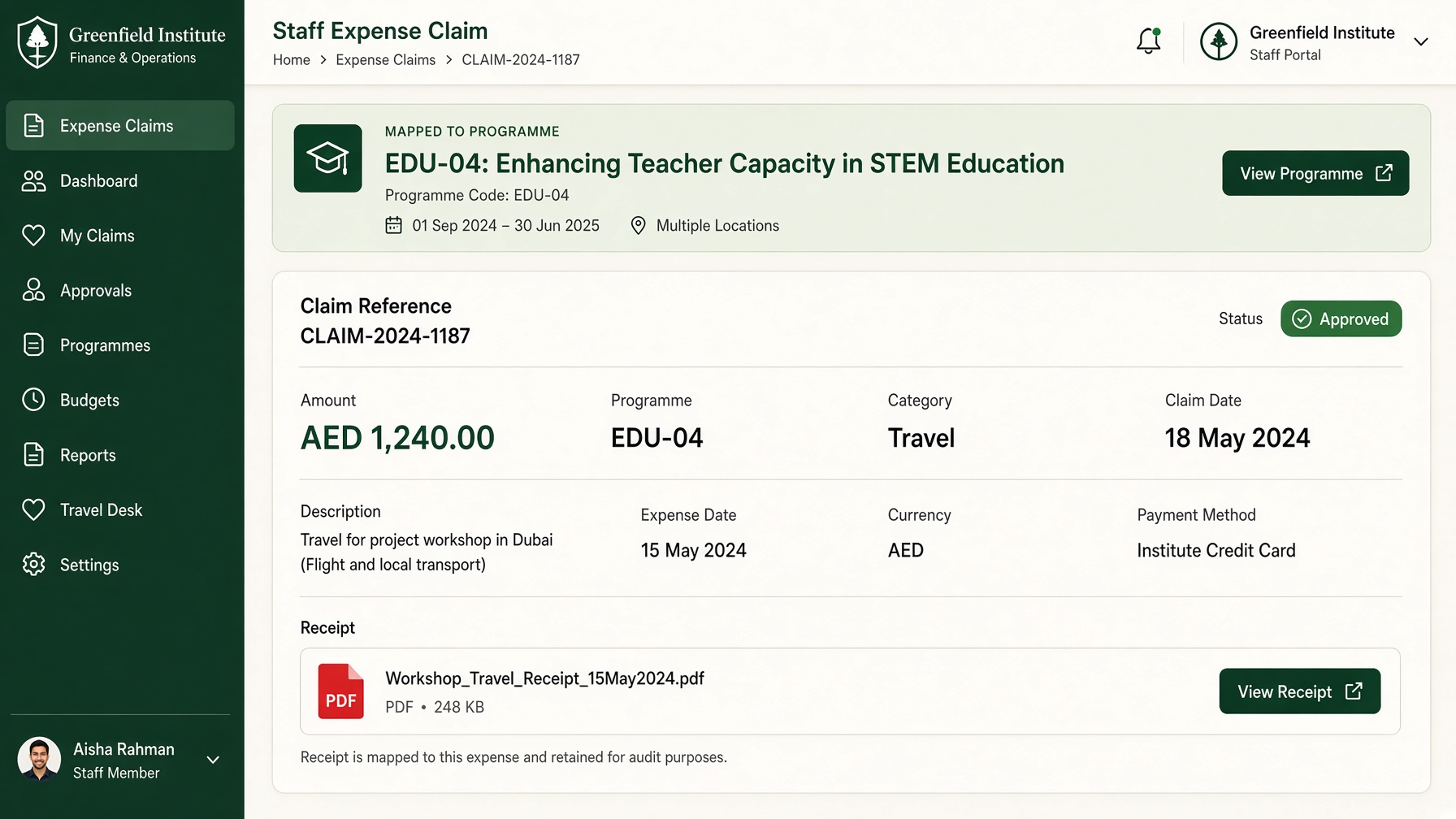
What a claim looks like in practice
Amount, programme, receipt, status — one screen. Payment still in your ERP.
- 01
Submit
Staff claim or vendor bill, with programme and cost centre.
- 02
Attach
Receipt sits on the record. Ubu can flag a gap.
- 03
Approve
Submitted, approved or rejected — with who and when.
- 04
Export
A trail mapped to the work, not a mystery spreadsheet.
From fire drills to a live record
Finance manager
From
Chasing programme codes at month-end
To
Claims already mapped
Programme lead
From
No view of spend against delivery
To
Money next to activities
Auditor
From
Sampling folders
To
A downloadable trail
Questions buyers actually ask
- Does IMP replace NetSuite or the general ledger?
- No. IMP is the operational layer: claims and vendor bills tied to programmes. It is designed to sit upstream of finance/ERP and BI — not to replace them. Finance is EMS-light, by design.
- Can Ubu help with receipts?
- Ubu can read a receipt, flag a gap, and draft the next step. A human still Accepts. IMP never auto-pays.
- Is this on every package?
- Finance claims and vendors are part of the operational workspace. Name volume, multi-currency or cost-centre depth on the invoice request — those drivers are in the price book, not hidden.
Explore more of IMP
The work stays when people leave
Don’t wait for the laptop to be on a plane. Brief the cycle the way you would brief a successor.
Already have the note? Tell us about this cycle — we price from that.